 Keyshift
Free Chrome extension
Change the key and speed of any song in your browser
Keyshift shifts the pitch and tempo of the audio in any tab. Loop the hard part, slow it down, and mute the vocals or bass to play along. Everything runs on your computer.
Try it here
This short loop is made in your browser. Change the key and the tempo separately, and turn parts on or off. Keyshift does the same to real songs in any tab.
Press play, then move the sliders.
What Keyshift does
It works on YouTube, SoundCloud, Bandcamp, Spotify, and almost any other site that plays sound.
Change the key
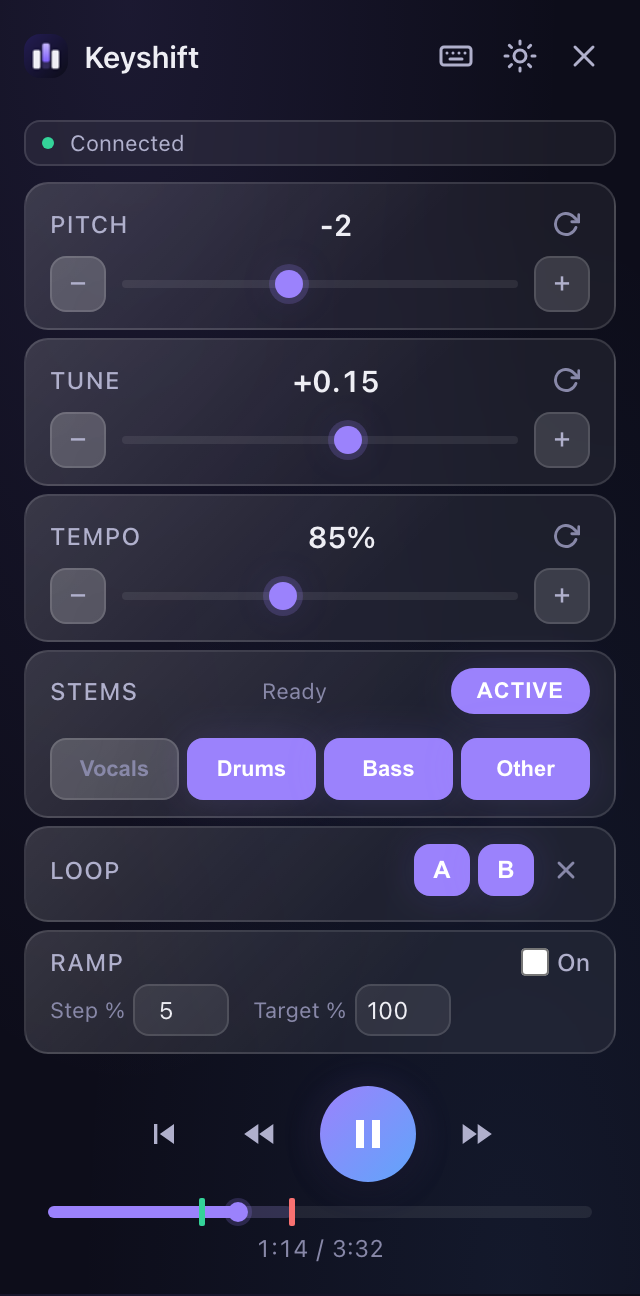
Shift up to 12 semitones up or down. Fine tune to 0.01 of a semitone for songs that aren't at A = 440 Hz.
Change the speed
Play from 25% to 250% speed without changing the key. Slow a fast solo down until you can hear every note.
Loop and ramp up
Set points A and B to repeat a section. Turn on the speed ramp and each pass gets a little faster until you reach full speed.
Split into stems
Separate a song into vocals, drums, bass, and other with the Demucs model. Turn any part off and play along with the rest.
Private by design
Audio never leaves your computer. There is no account, no server, and no tracking.
Keyboard first
Change pitch and tempo without touching the mouse. It remembers your settings for each page.
How to install
Keyshift isn't in the Chrome Web Store yet, so you add it by hand. It takes about a minute.
- Download and unzip
Download the zip, then double-click it to unzip. Move the
keyshift-1.0.0folder somewhere it can stay, like Documents. Chrome loads it from there. - Open the extensions page
Copy this address into Chrome's address bar and press Enter. Websites can't link to it directly.
chrome://extensions - Turn on Developer mode
Use the switch in the top right corner of the extensions page.
- Load the folder
Click Load unpacked and choose the folder you unzipped.
- Pin it and play
Click the puzzle piece in the toolbar and pin Keyshift. Play a song in any tab, then click the Keyshift icon.
If something goes wrong
Fixes for the problems people run into most. You can also ask a question.
The popup says Keyshift can't run on this page
Chrome doesn't let extensions touch its own pages, like chrome:// pages, the new tab page, and the Chrome Web Store. Open the song in a normal tab and try again.
Tempo, loop, or play controls say "Not available"
That site doesn't use a standard audio or video player, so Keyshift can't control playback. Pitch still works. Tempo can still go down to slow the audio, and Resync catches it back up to live.
For stems on these sites, click Record, play the part you want, then click Stop.
The audio is behind or out of sync
This happens when a site has no standard player and you slow the tempo. Press the Resync button (where play usually is) to jump back to live.
Stem separation fails or takes a long time
The first separation loads a 75 MB model, and a four-minute song can take a few minutes on a laptop. Close other heavy tabs and try again. After that, the same song opens right away from the cache.
If Separate fails on a site, use Record instead.
Keyshift says the tab is already being captured
Only one extension can capture a tab's audio at a time. Stop screen sharing or other audio extensions on that tab, then open Keyshift again.
How do I update?
Download the new zip, replace the old folder with the new one, then click the reload arrow on the Keyshift card at chrome://extensions. Your settings stay.
Questions
Is it really free?
Yes. There's no paid tier, no account, and no ads. The code is MIT licensed on GitHub.
How do I remove the vocals or another part?
Play the song, open Keyshift, and click Separate in the Stems row. When it finishes, click Vocals to turn them off. Click it again to bring them back. The same works for drums, bass, and other.
If the button says Record instead, click it, play the part you want, then click Stop.
Does Keyshift upload my audio?
No. Pitch shifting and stem separation run in your browser. The only download Keyshift makes is the song file itself, from the site you're on, when you click Separate. It asks for access to that one site first.
Which browsers work?
Chrome 116 or later, and other Chromium browsers like Edge, Brave, and Arc. Safari and Firefox aren't supported.
Why isn't it in the Chrome Web Store?
It isn't listed yet. Until it is, you install it with Load unpacked, which gives you the same extension.
What does "stems" mean?
A stem is one part of a song, like the vocals or the drums. Keyshift uses the Demucs model from Meta AI Research to split a song into four: vocals, drums, bass, and everything else.
Free and open source
Read the code, report a site that doesn't work, or send a fix. Keyshift uses SoundTouch for pitch shifting and Demucs for stems.